Main Lobby
Game Screens408
■Main Lobby
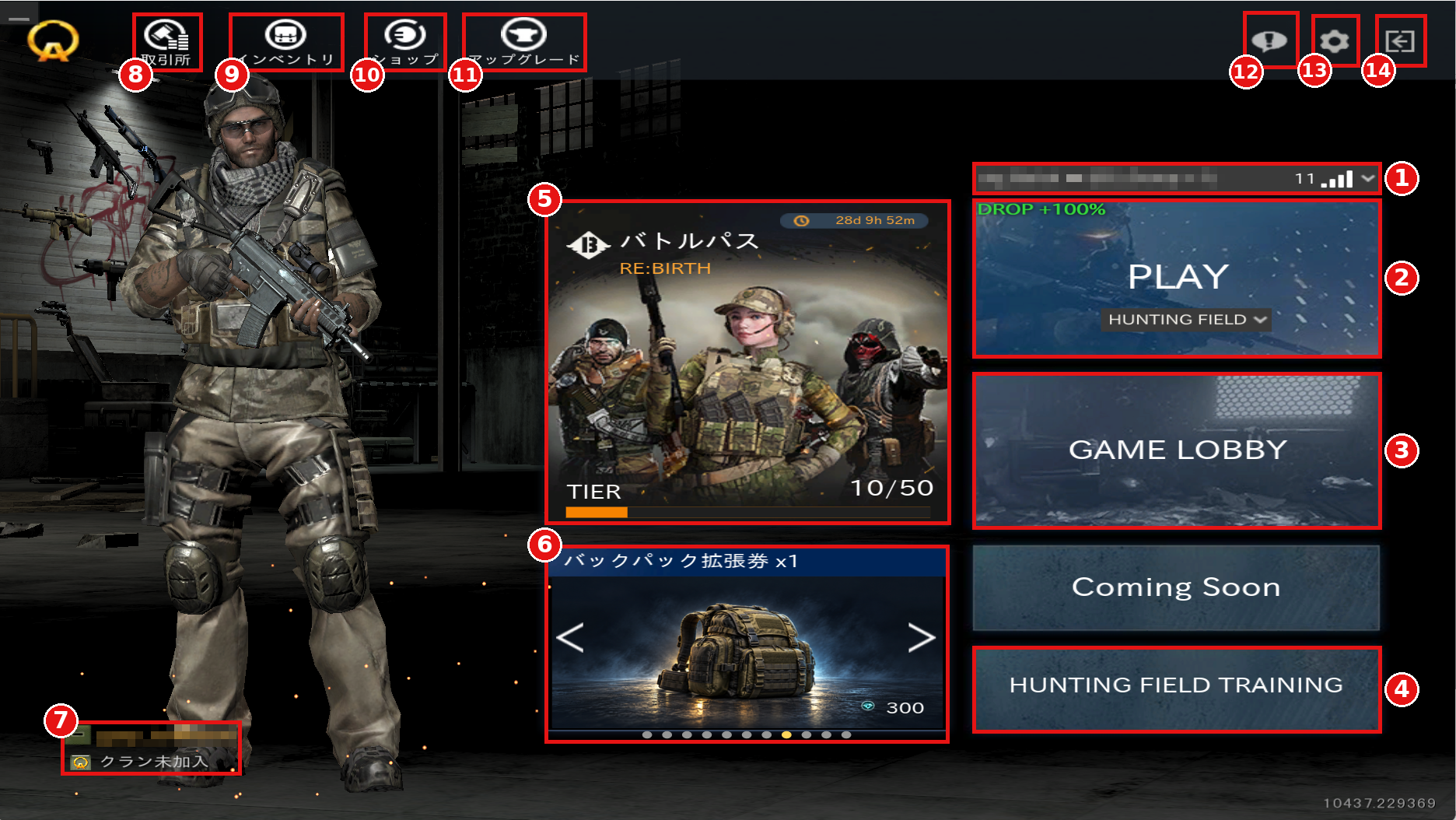
①Server Selection
Select the server you want to connect to.
The number and signal icon on the right give a simple indication of your connection status to the server. Please use them as a reference when choosing a server.
②Quick Play
Select the mission (game mode) you want to play and start matchmaking right away.
When a special event is running, the event effect is displayed in the upper left.
③GAME LOBBY
Go to the Game Lobby.
For details, see "Game Lobby."
④HUNTING FIELD TRAINING
Practice on the Hunting Field maps.
You play with preset equipment, and your HP never drops to 0, so you can try out the Hunting Field casually.
※Items obtained during training cannot be kept.
⑤Battle Pass
Displays the remaining period of the Battle Pass and your current TIER.
⑥Featured Items
Displays featured items from the Shop, which can be purchased right here.
Use the left and right arrows to switch between items.
⑦Player Information
Displays your character name and clan (to be implemented in a future update).
⑧Exchange (取引所)
Go to the Exchange.
⑨Inventory (インベントリ)
Go to the Inventory.
For details, see "Inventory."
⑩Shop (ショップ)
Go to the Shop.
For details, see "Shop."
⑪Upgrade (アップグレード)
Go to the Upgrade screen.
⑫Quests
Check your quests and their progress.
⑬Settings
Open the Settings menu.
For details, see "Settings."
⑭Exit
Exit the game.
①Server Selection
Select the server you want to connect to.
The number and signal icon on the right give a simple indication of your connection status to the server. Please use them as a reference when choosing a server.
②Quick Play
Select the mission (game mode) you want to play and start matchmaking right away.
When a special event is running, the event effect is displayed in the upper left.
③GAME LOBBY
Go to the Game Lobby.
For details, see "Game Lobby."
④HUNTING FIELD TRAINING
Practice on the Hunting Field maps.
You play with preset equipment, and your HP never drops to 0, so you can try out the Hunting Field casually.
※Items obtained during training cannot be kept.
⑤Battle Pass
Displays the remaining period of the Battle Pass and your current TIER.
⑥Featured Items
Displays featured items from the Shop, which can be purchased right here.
Use the left and right arrows to switch between items.
⑦Player Information
Displays your character name and clan (to be implemented in a future update).
⑧Exchange (取引所)
Go to the Exchange.
⑨Inventory (インベントリ)
Go to the Inventory.
For details, see "Inventory."
⑩Shop (ショップ)
Go to the Shop.
For details, see "Shop."
⑪Upgrade (アップグレード)
Go to the Upgrade screen.
⑫Quests
Check your quests and their progress.
⑬Settings
Open the Settings menu.
For details, see "Settings."
⑭Exit
Exit the game.