Game Lobby
Game Screens396
■Game Lobby
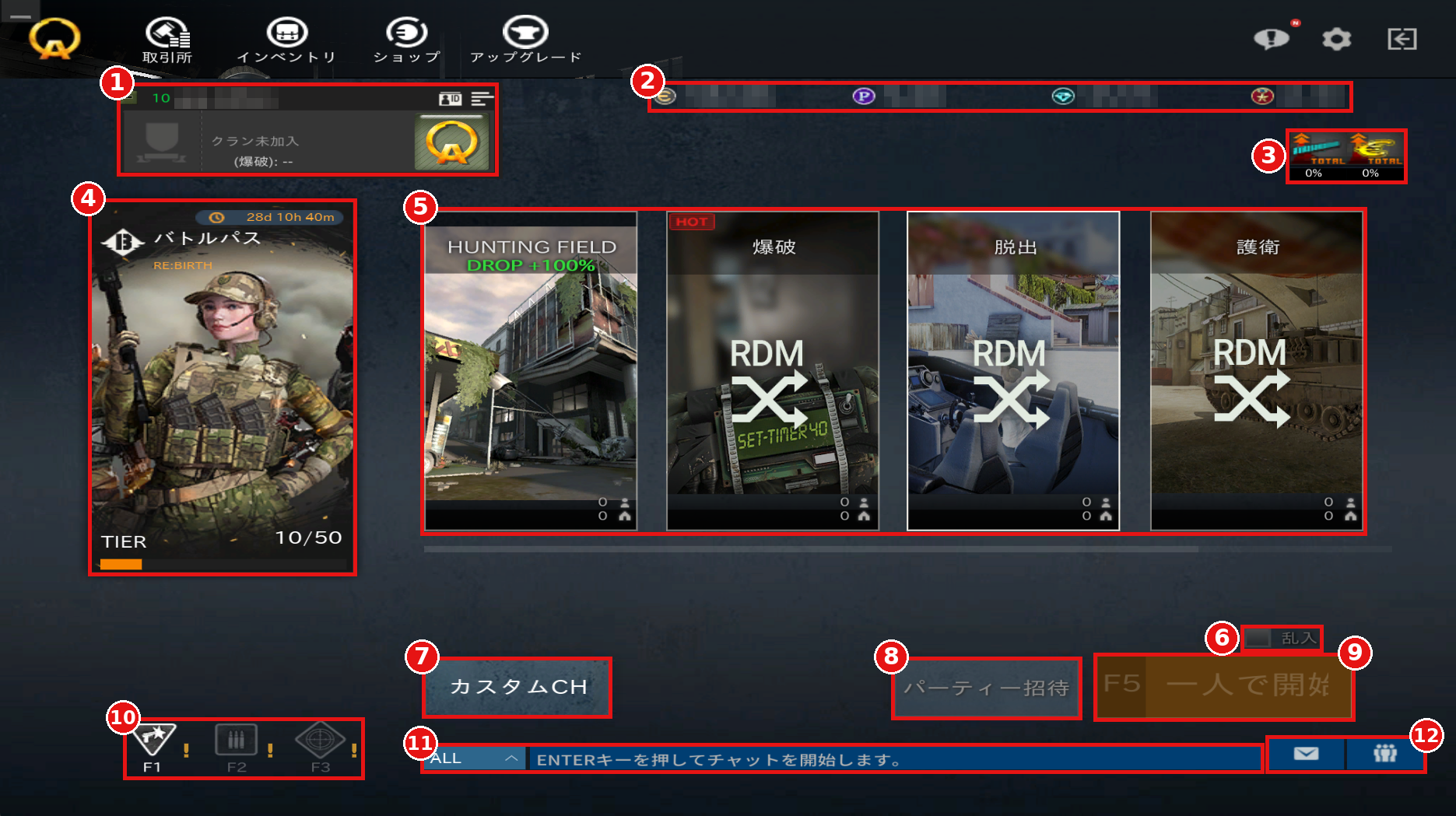
①Player Information
Displays your character name, clan (to be implemented in a future update), and ID tag.
You can change your title and name card from the "ID" button.
②Currency
Displays the currency you currently have.
③Boosts
Displays the EXP and EUR gain rates, from left to right.
When a boost is active, the multiplier is displayed.
④Battle Pass
Displays the remaining period of the Battle Pass and your current TIER.
⑤Mission (Game Mode) Selection
Select the mission (game mode) you want to play.
Matchmaking from the lobby uses the "Quick Match" system. You will be randomly matched with other users waiting for the same mission (game mode), and the map is also selected at random.
The lower right of each card shows the number of players waiting (person icon) and the number of rooms currently in progress (house icon).
⑥Join in Progress (乱入)
When checked, you may also join games that are already in progress.
When unchecked, you will only join newly created rooms.
⑦Custom CH (カスタムCH)
Go to the Custom Lobby.
⑧Party Invite (パーティー招待)
Becomes available when you select a mission (game mode) that supports party play.
⑨Start Game (F5)
Start matchmaking for the selected mission (game mode).
⑩Class Selection
Switch between Pointman (F1), Rifleman (F2), and Sniper (F3).
⑪Chat
Press the Enter key to type in chat.
⑫Mailbox / Friends
In the Mailbox, you can check messages from other players as well as items you have obtained, items distributed in events, items obtained from the Exchange, and more.
From the Friends button, you can invite users to your party.
■Party Play
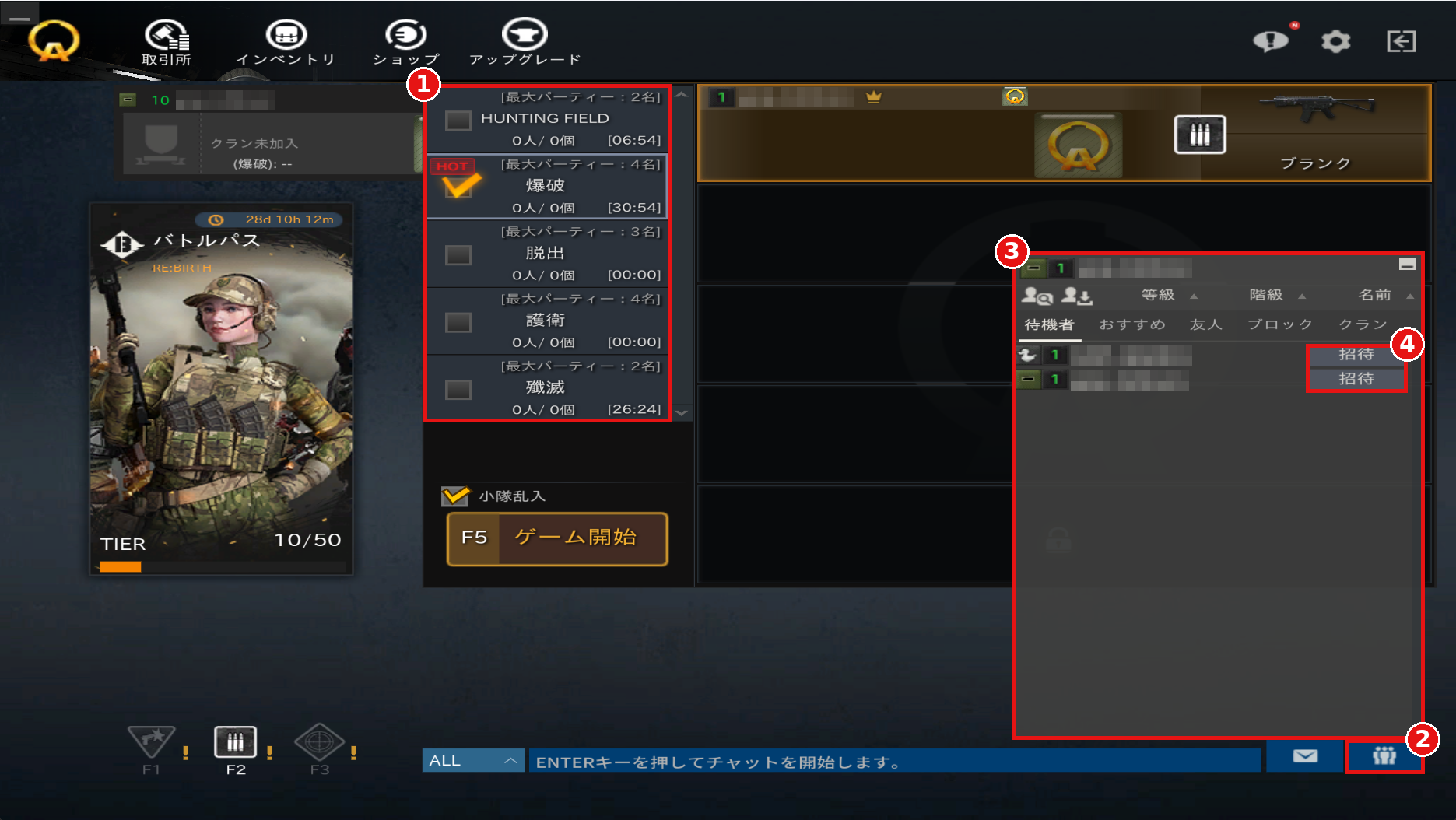
①Select the mission (game mode) you want to play.
The number of players who can form a party differs by mission (game mode). Check the [最大パーティー] (Max Party) number for each mission (game mode).
②Press the Friends button in the lower right to open the invite window.
③Find the user you want to invite from tabs such as Waiting, Recommended, and Friends.
④Press the "Invite" (招待) button to invite the user.
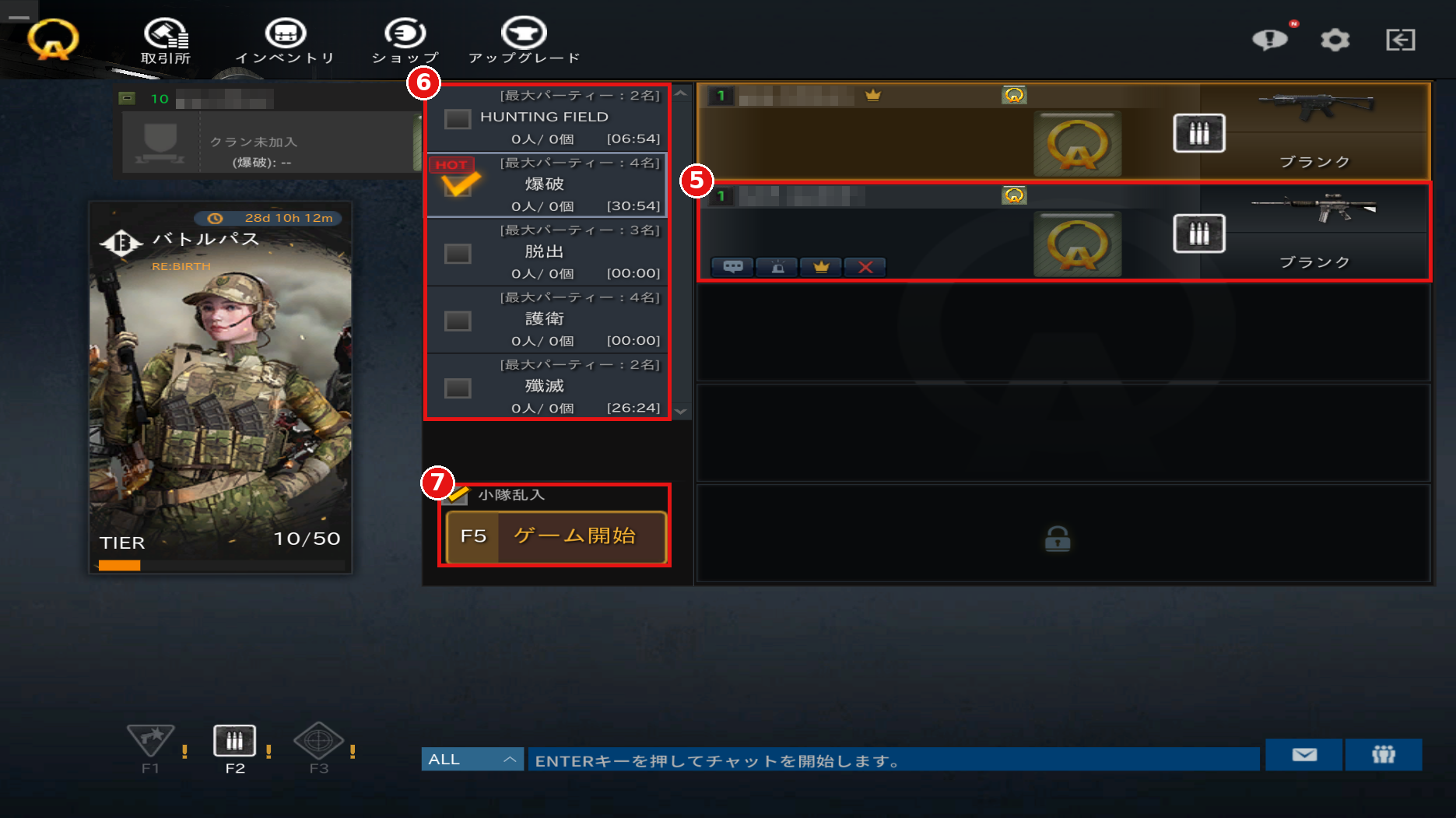
⑤When the invitation is accepted, that user's equipment is displayed.
⑥You can select the mission (game mode) to play together again.
⑦Press "Start Game" (ゲーム開始) to start matchmaking as a party.
①Player Information
Displays your character name, clan (to be implemented in a future update), and ID tag.
You can change your title and name card from the "ID" button.
②Currency
Displays the currency you currently have.
③Boosts
Displays the EXP and EUR gain rates, from left to right.
When a boost is active, the multiplier is displayed.
④Battle Pass
Displays the remaining period of the Battle Pass and your current TIER.
⑤Mission (Game Mode) Selection
Select the mission (game mode) you want to play.
Matchmaking from the lobby uses the "Quick Match" system. You will be randomly matched with other users waiting for the same mission (game mode), and the map is also selected at random.
The lower right of each card shows the number of players waiting (person icon) and the number of rooms currently in progress (house icon).
⑥Join in Progress (乱入)
When checked, you may also join games that are already in progress.
When unchecked, you will only join newly created rooms.
⑦Custom CH (カスタムCH)
Go to the Custom Lobby.
⑧Party Invite (パーティー招待)
Becomes available when you select a mission (game mode) that supports party play.
⑨Start Game (F5)
Start matchmaking for the selected mission (game mode).
⑩Class Selection
Switch between Pointman (F1), Rifleman (F2), and Sniper (F3).
⑪Chat
Press the Enter key to type in chat.
⑫Mailbox / Friends
In the Mailbox, you can check messages from other players as well as items you have obtained, items distributed in events, items obtained from the Exchange, and more.
From the Friends button, you can invite users to your party.
■Party Play
①Select the mission (game mode) you want to play.
The number of players who can form a party differs by mission (game mode). Check the [最大パーティー] (Max Party) number for each mission (game mode).
②Press the Friends button in the lower right to open the invite window.
③Find the user you want to invite from tabs such as Waiting, Recommended, and Friends.
④Press the "Invite" (招待) button to invite the user.
⑤When the invitation is accepted, that user's equipment is displayed.
⑥You can select the mission (game mode) to play together again.
⑦Press "Start Game" (ゲーム開始) to start matchmaking as a party.