Unable to Log into the Game (VFUN Launcher)
Beginner's Guide297
If you are unable to log in, please follow the steps below to troubleshoot the issue:
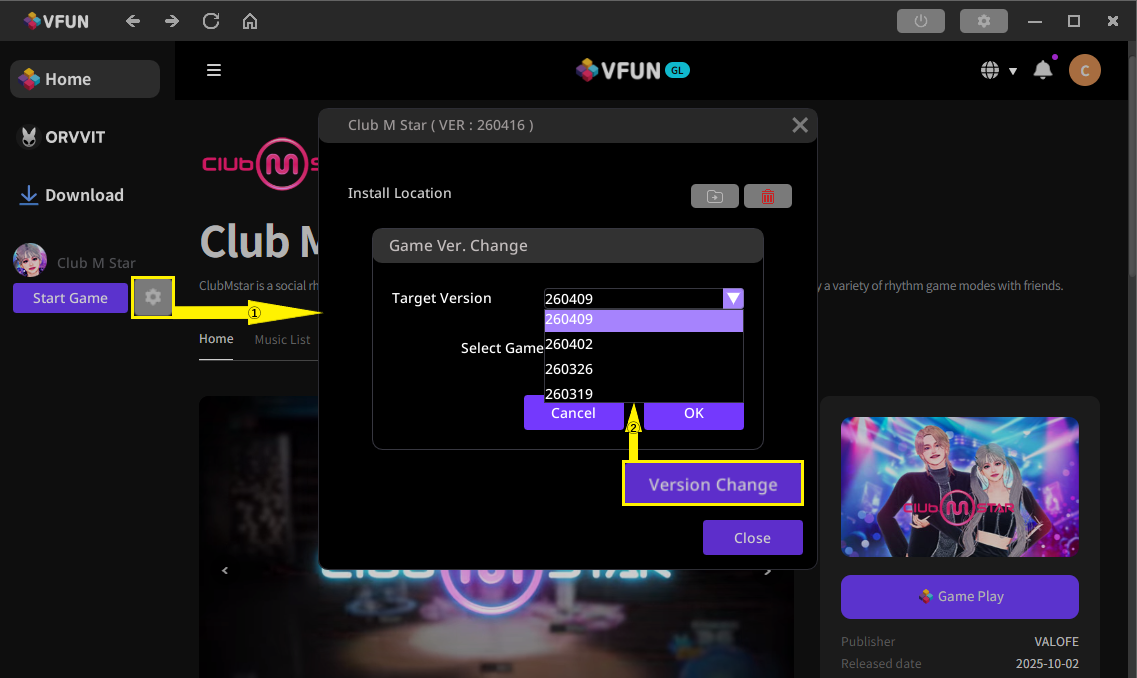
・Repatch the Game
①Click the Settings button on the right side of the "Start Game" button.
②Click "Version Change" in the bottom right corner of the window.
③In the "Target Version" section, select the version you want to switch to.
※We recommend changing to an earlier version.
Example: If the current version is 260409, change it to 260402.
④Click OK and close the window.
・After the repatch is complete, restart your computer.
・Close any other applications that may conflict with GameGuard.
・If you still cannot log in after completing the above steps, please contact our Customer Support for further assistance.