Settings
Game Screens380
■Settings (Video)
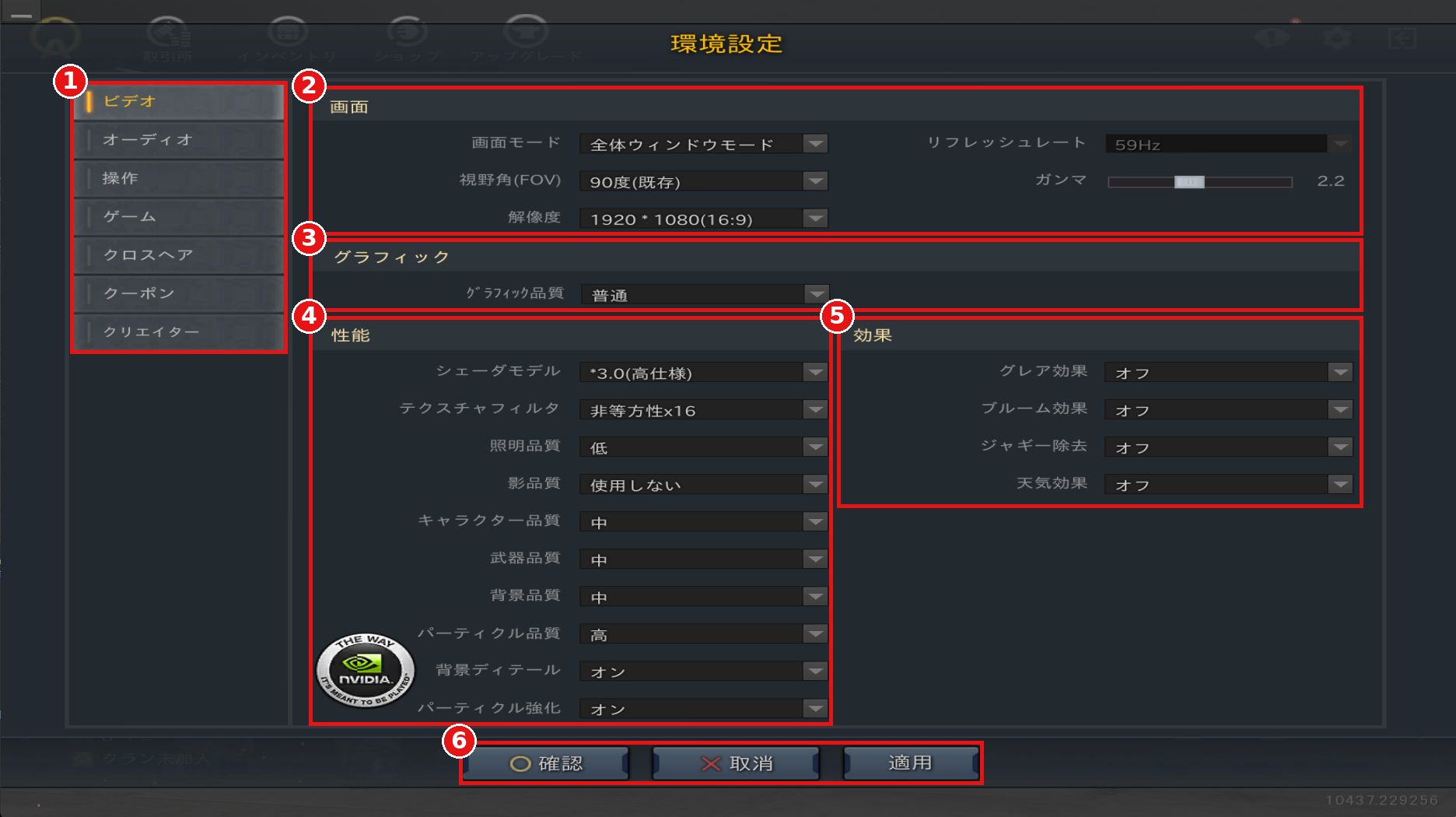
①Settings Categories
Select the category you want to configure.
②Screen
Set the screen mode, field of view (FOV), resolution, refresh rate, and gamma.
③Graphics
Set the overall graphics quality at once.
④Performance
Individually configure items related to rendering performance, such as shader model and shadow quality.
⑤Effects
Turn glare, bloom, anti-aliasing, and weather effects on or off.
⑥Confirm / Cancel / Apply
"Apply" (適用) applies your changes, and "Confirm" (確認) applies them and closes the screen.
"Cancel" (取消) discards your changes and closes the screen.
■Settings (Audio)
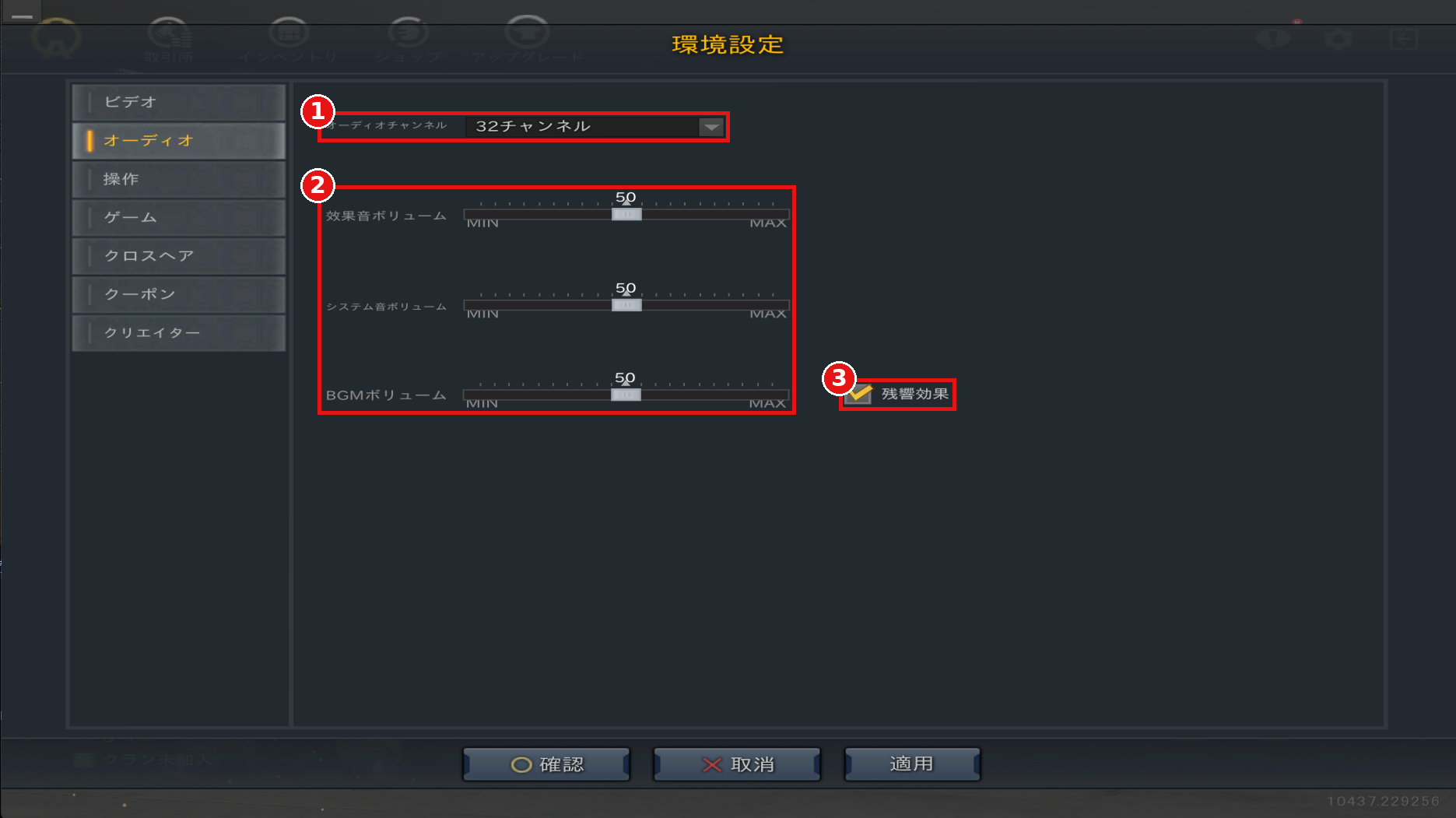
①Audio Channels
Set the number of audio channels that can play at the same time.
②Volume
Adjust the volume of sound effects, system sounds, and BGM individually.
③Reverb
When turned on, reverb is added to sounds and bass is emphasized.
■Settings (Controls)
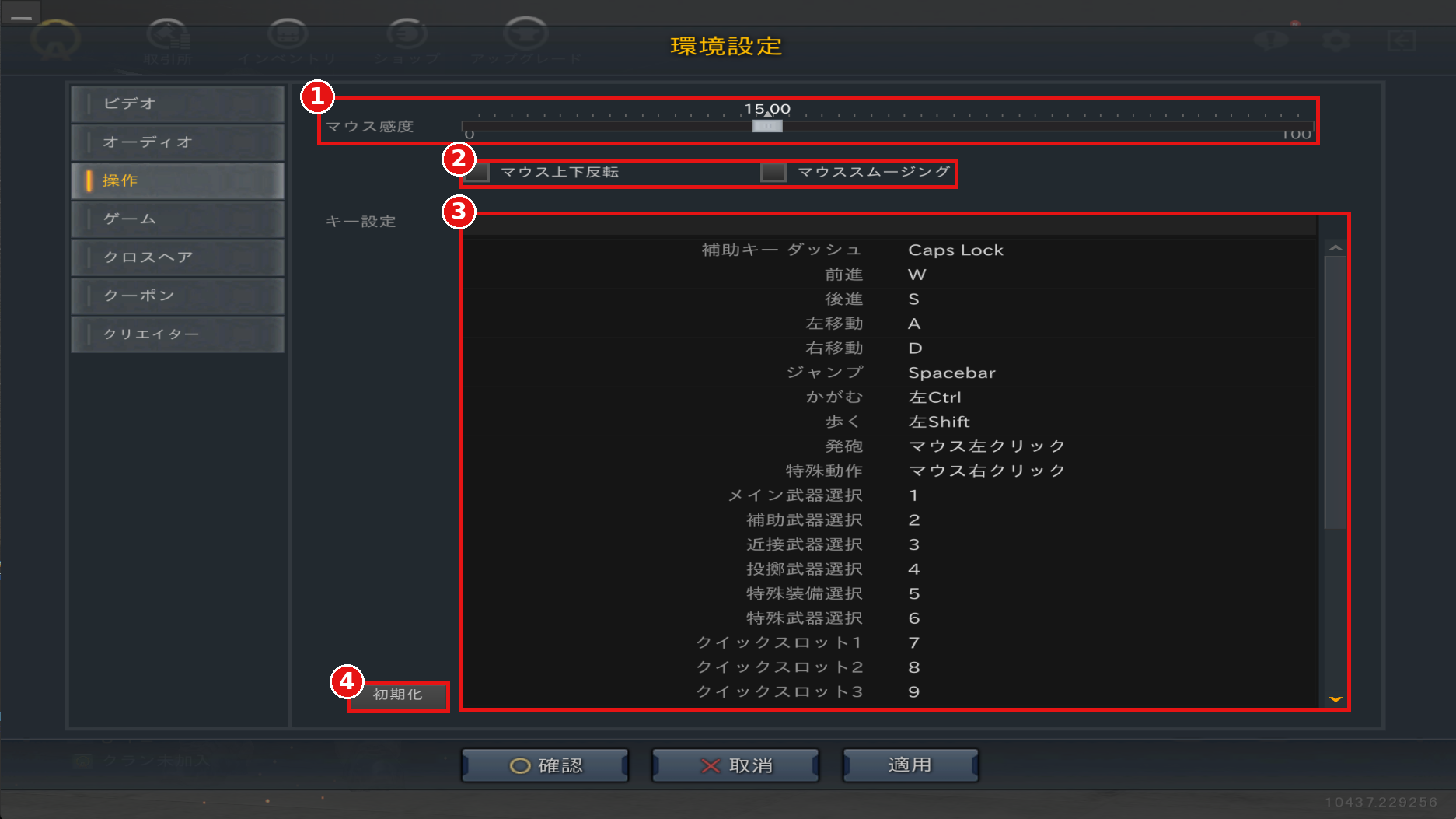
①Mouse Sensitivity
The higher the value, the faster your view moves.
②Invert Mouse / Mouse Smoothing
Assist settings for mouse control.
③Key Bindings
Change the keys and mouse buttons assigned to each action.
④Reset
Restore key bindings to their default settings.
■Settings (Game)
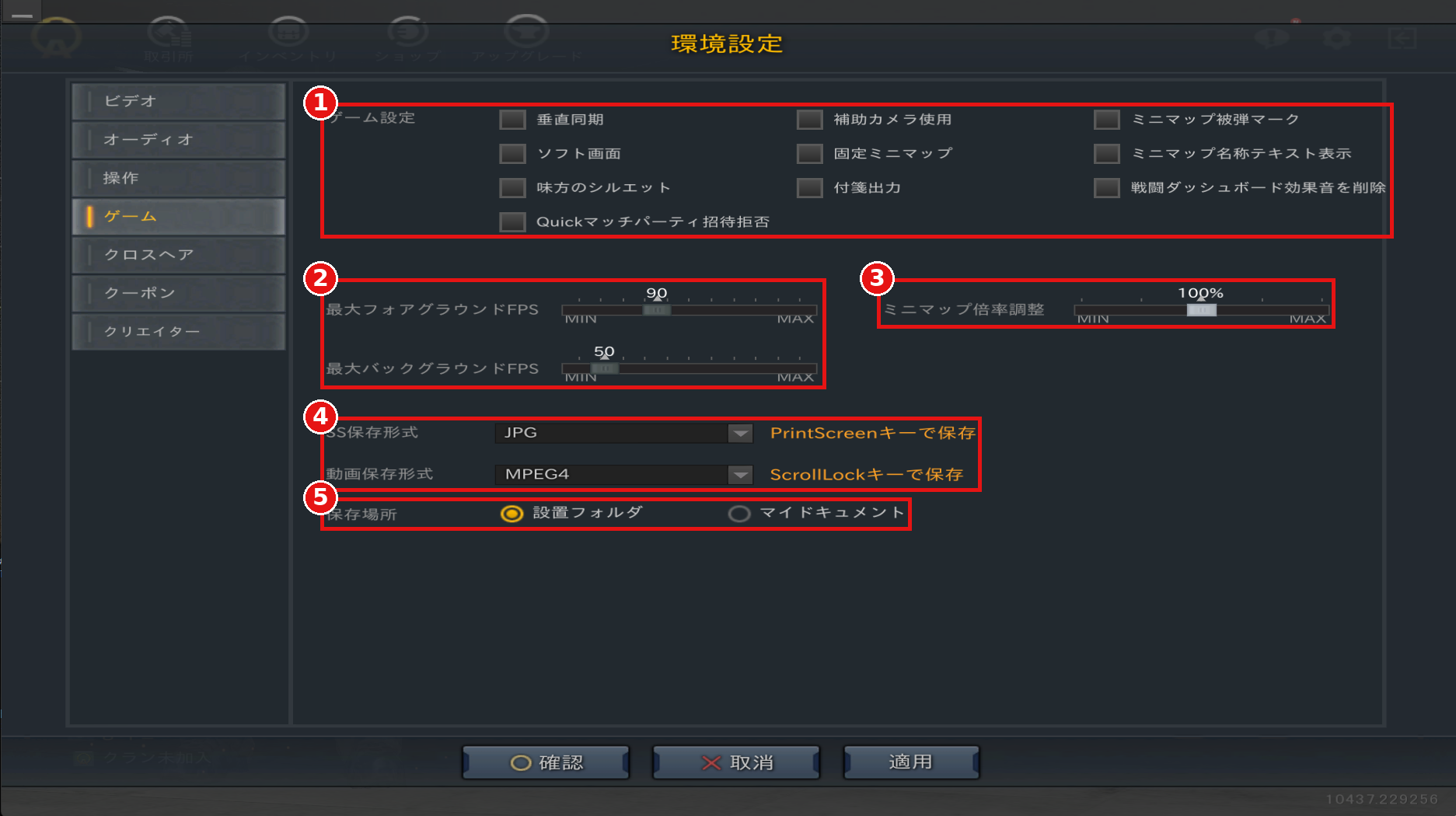
①Game Settings
Configure gameplay settings such as V-Sync and minimap display.
②Max FPS
Set the maximum frame rate for when the game window is active (foreground) and inactive (background).
③Minimap Zoom
Adjust the zoom level of the minimap.
④Save Format
Select the save format for screenshots and videos.
Screenshots can be saved with the PrintScreen key, and videos with the ScrollLock key.
⑤Save Location
Select where screenshots and videos are saved.
■Settings (Crosshair)
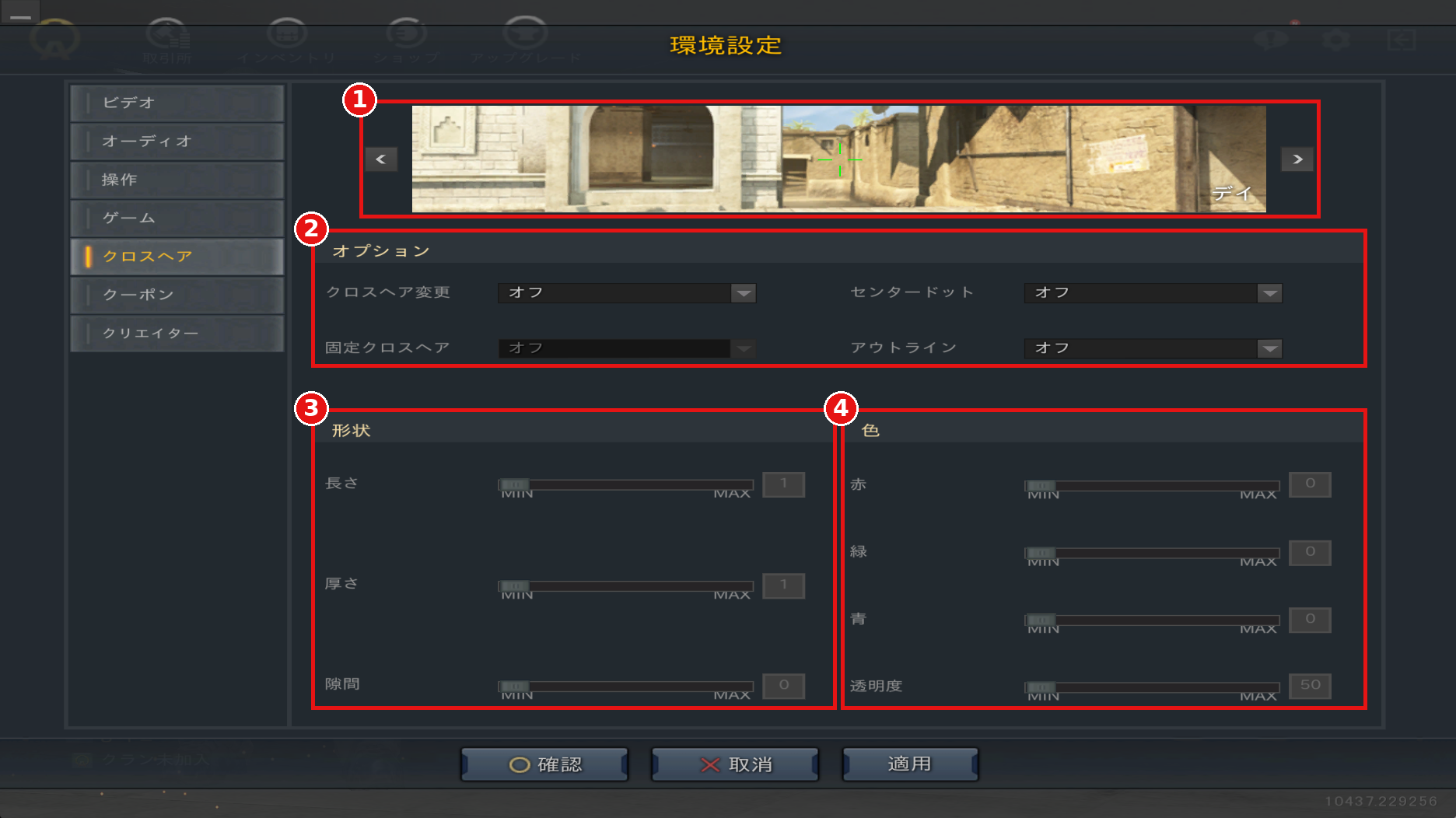
①Preview
Check how your crosshair looks with the current settings.
Use the left and right arrows to change the preview background.
②Options
Configure crosshair changes, center dot, outline, and more.
③Shape
Adjust the length, thickness, and gap of the crosshair.
④Color
Adjust the crosshair color (red, green, blue) and opacity.
①Settings Categories
Select the category you want to configure.
②Screen
Set the screen mode, field of view (FOV), resolution, refresh rate, and gamma.
③Graphics
Set the overall graphics quality at once.
④Performance
Individually configure items related to rendering performance, such as shader model and shadow quality.
⑤Effects
Turn glare, bloom, anti-aliasing, and weather effects on or off.
⑥Confirm / Cancel / Apply
"Apply" (適用) applies your changes, and "Confirm" (確認) applies them and closes the screen.
"Cancel" (取消) discards your changes and closes the screen.
■Settings (Audio)
①Audio Channels
Set the number of audio channels that can play at the same time.
②Volume
Adjust the volume of sound effects, system sounds, and BGM individually.
③Reverb
When turned on, reverb is added to sounds and bass is emphasized.
■Settings (Controls)
①Mouse Sensitivity
The higher the value, the faster your view moves.
②Invert Mouse / Mouse Smoothing
Assist settings for mouse control.
③Key Bindings
Change the keys and mouse buttons assigned to each action.
④Reset
Restore key bindings to their default settings.
■Settings (Game)
①Game Settings
Configure gameplay settings such as V-Sync and minimap display.
②Max FPS
Set the maximum frame rate for when the game window is active (foreground) and inactive (background).
③Minimap Zoom
Adjust the zoom level of the minimap.
④Save Format
Select the save format for screenshots and videos.
Screenshots can be saved with the PrintScreen key, and videos with the ScrollLock key.
⑤Save Location
Select where screenshots and videos are saved.
■Settings (Crosshair)
①Preview
Check how your crosshair looks with the current settings.
Use the left and right arrows to change the preview background.
②Options
Configure crosshair changes, center dot, outline, and more.
③Shape
Adjust the length, thickness, and gap of the crosshair.
④Color
Adjust the crosshair color (red, green, blue) and opacity.