【Special Announcement】How to Spot an Official GM?
 GM_Yurei
This is a reminder to all our Dancers,
To ensure our community remains a safe and secure environment, we want to remind all players to be vigilant against impersonators. Official representatives of our team will always carry a specific mark of authenticity.
How to Verify Official Staff
Whenever you see a post, comment, or direct message claiming to be from a Game Master (GM) or Operator, look for the Official GM Icon next to their name:
The Icon: A blue, stylized "head-and-shoulders" avatar with a headset/visor (as shown in the image)
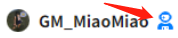
This icon appears immediately to the right of the username.
⚠️ Security Reminders
Check Before You Click: If a user without this icon asks for your account information or directs you to external links, do not engage.
Privacy First: Official GMs will never ask for your account password or sensitive personal financial information.
Report Impersonators: If you encounter someone pretending to be a GM without the official icon, please use the in-app report function immediately so we can take action.
Always look for the blue icon! If the badge isn't there, it isn't us.
Stay safe and enjoy dancing~!
View posts on ORVVIT