Information on Installation and Launch Issues
 GM_Winter
Information on Installation and Launch Issues |
|---|
We would like to provide information on installation and launch issues currently confirmed by the Operations Team, as well as possible solutions.
■ Unable to Launch the Game Launcher Due to Error Code (610)
Installing the following two files on your PC may resolve the issue. Please try installing them.
[Download Links]
Microsoft Visual C++ Redistributable Package (x86)
https://downloader-cdn.icarusonline.co.kr/utill/vcredist_x86.exe
DirectX End-User Runtime
https://downloader-cdn.icarusonline.co.kr/utill/dxwebsetup.exe
■ Slow Game Download Speed (VFUN Version)

If the game client is downloading slowly, changing the download speed limit to "MAX" in the VFUN Launcher settings may improve the download speed.
[How to Change the Setting]
 Click the button to open the settings.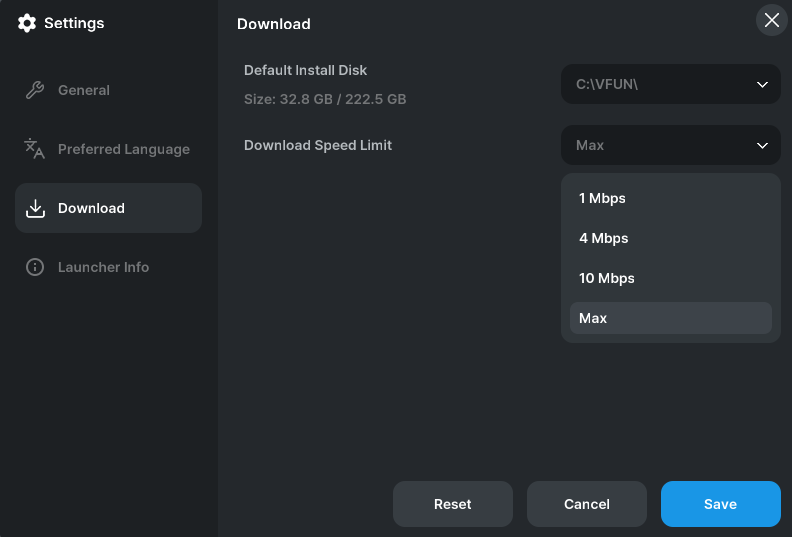
Under the Download tab, change "Download Speed Limit" to "MAX."Click the "Save" button to apply the setting.
Other Issues |
|---|
If any other installation or launch issues are identified in addition to those currently listed above, we will provide updates in this notice as needed.
View posts on ORVVIT