Custom Lobby
Game Screens369
■Custom Lobby
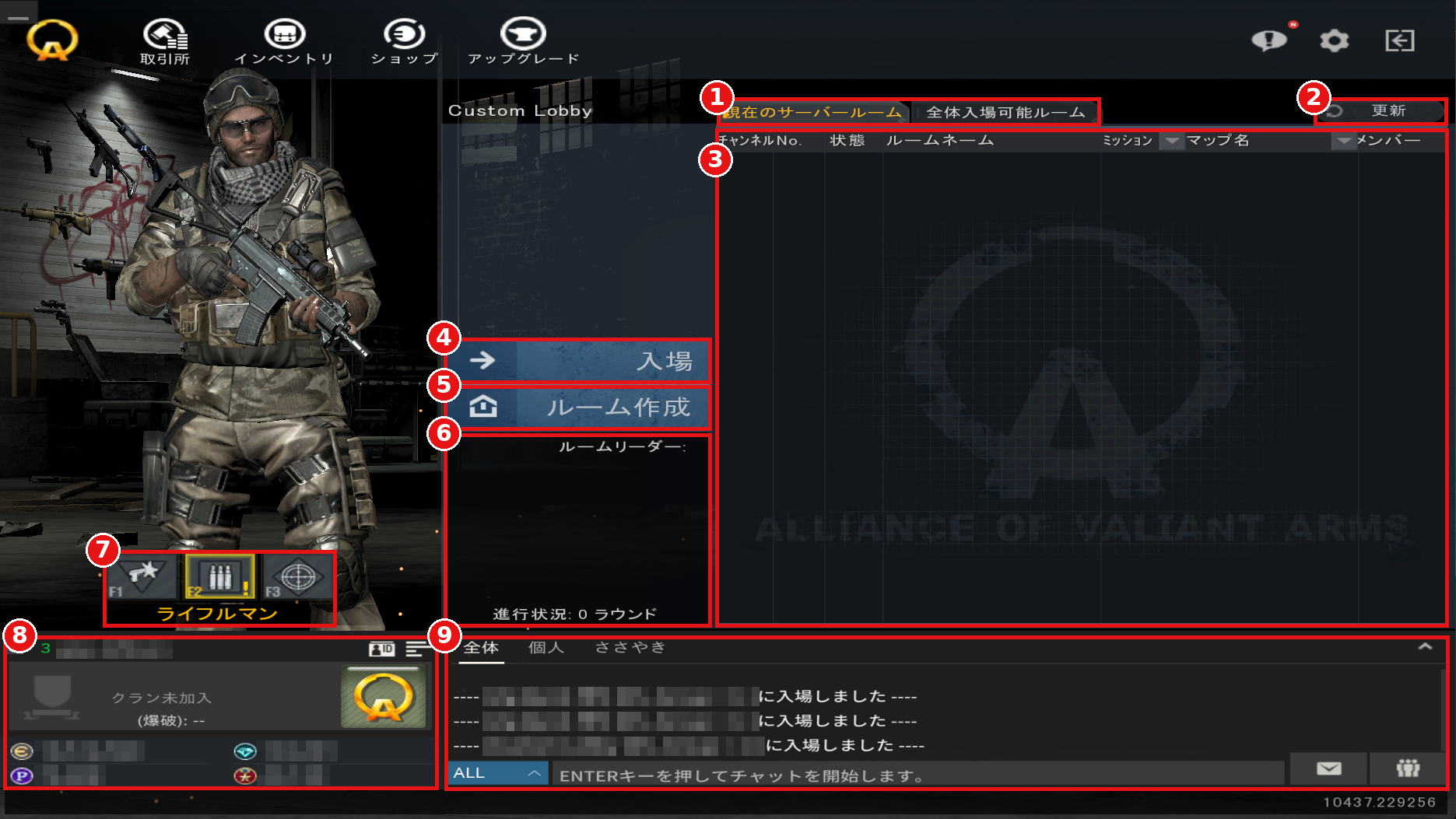
①Room Display Toggle
Switch which rooms are displayed in the list.
"Current Server Rooms" (現在のサーバールーム) shows rooms on the server you are connected to, and "All Joinable Rooms" (全体入場可能ルーム) shows every room you can join.
②Refresh
Update the room list to the latest state.
③Room List
Displays created rooms along with their channel number, status, room name, mission, map name, and number of members.
④Join (入場)
Select a room from the list and press this button to join.
You can also join by double-clicking a room.
⑤Create Room (ルーム作成)
Use this to create a new room. Pressing the button opens the "Create Game Room" window. Set the mission, number of members, rules, and other options to create your room.
⑥Room Information
Displays the room leader, current mission and map, progress, and other details for the selected room.
⑦Class Selection
Choose from Pointman, Rifleman, and Sniper.
You can also switch using the F1–F3 keys.
⑧Player Information
Displays your character name, clan, currency, and more.
⑨Chat
Chat with other players. Select a language in the lower left to switch the language used for displaying and typing chat.
①Room Display Toggle
Switch which rooms are displayed in the list.
"Current Server Rooms" (現在のサーバールーム) shows rooms on the server you are connected to, and "All Joinable Rooms" (全体入場可能ルーム) shows every room you can join.
②Refresh
Update the room list to the latest state.
③Room List
Displays created rooms along with their channel number, status, room name, mission, map name, and number of members.
④Join (入場)
Select a room from the list and press this button to join.
You can also join by double-clicking a room.
⑤Create Room (ルーム作成)
Use this to create a new room. Pressing the button opens the "Create Game Room" window. Set the mission, number of members, rules, and other options to create your room.
⑥Room Information
Displays the room leader, current mission and map, progress, and other details for the selected room.
⑦Class Selection
Choose from Pointman, Rifleman, and Sniper.
You can also switch using the F1–F3 keys.
⑧Player Information
Displays your character name, clan, currency, and more.
⑨Chat
Chat with other players. Select a language in the lower left to switch the language used for displaying and typing chat.