Main Interface
Beginner's Guide331
Basic Interface Introduction
After completing the tutorial, you will be taken to your personal private space called the "Dress Room".
Here are the main features of the Dress Room:
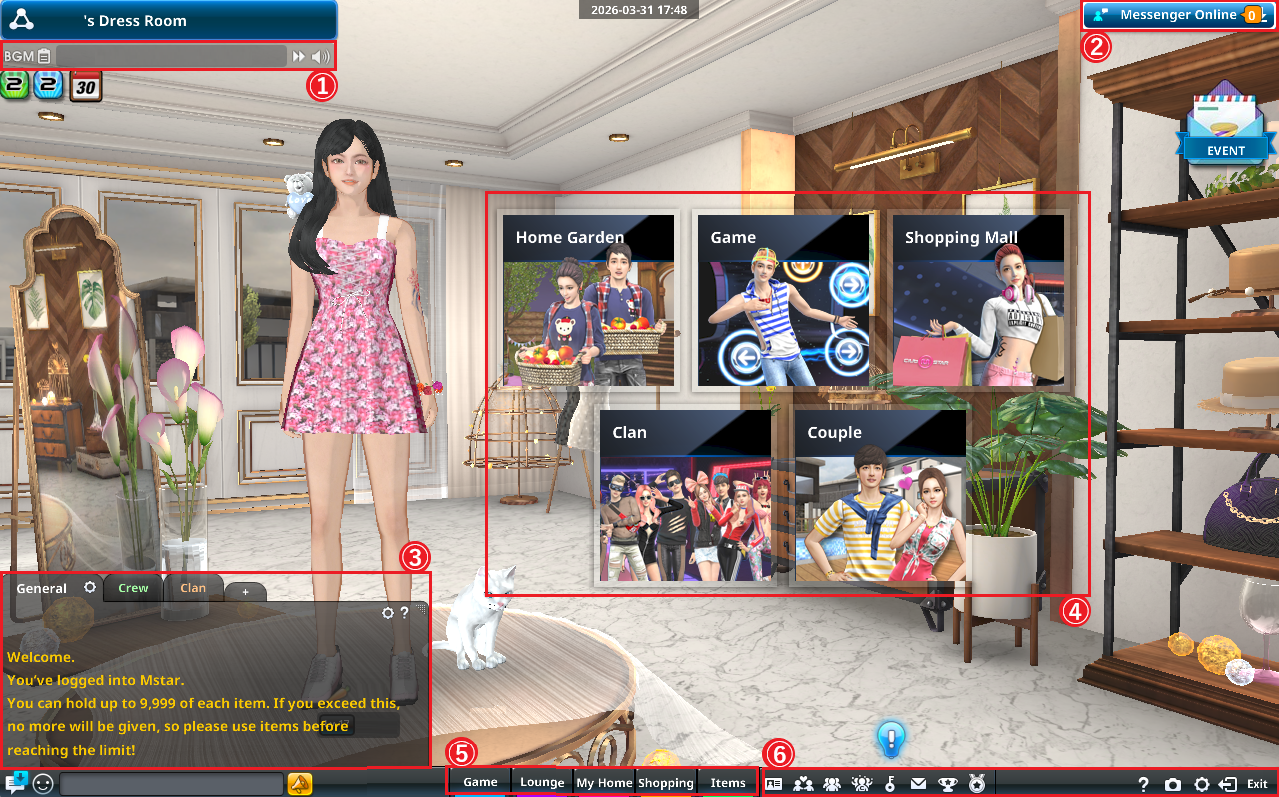
① BGM
Listen to the music tracks available to play in ClubMStar.
② Messenger
Manage your couple relationship and friends list.
③ Chat Window
Check game messages and participate in general chat or tabbed chats.
④ Home Garden / Game / Shopping Mall / Couple / Clan
| Home Garden |
A personal or couple space where you can decorate your home, grow crops, and invite friends to spend time together. |
| Game | The real fun of ClubMStar! Move to different servers and enjoy rhythm game battles. |
| Shopping Mall |
Use M Coins, Candy, or Cash to exchange for stylish fashion items, home items, functional items, couple items, and many more. |
| Couple | View information related to your couple. ※ This feature is unavailable if you have not formed a couple yet. |
| Clan | Check information about the clan you have joined. ※ This feature is unavailable if you are not a member of any clan. |
⑤ Game/ Lounge / My Home / Shopping / Items
| Game | ※Same as the "Game" section in ④ . |
| Lounge | A social hub with various themed spaces and different atmospheres. You can talk to NPCs to accept daily quests, receive buffs, dismantle or synthesize items, and more. It is also a lively plaza where you can meet and interact with other dancers. |
| My Home | ※Same as the "Home Garden" section in ④. |
| Shopping | ※Same as the "Shopping Mall" section in ④. |
| Items | View all items currently in your possession. |
⑥ Other
| My Info | View and edit your personal information. |
| Couple | ※Same as the "Couple" section in ④. |
| Crew | View information about the crew you have joined. |
| Clan | ※Same as the "Clan" section in ④. |
| Mailbox | Send and receive messages with other dancers, and check gifts you have received. |
| Collection | Track your progress in various in-game collections and enjoy the satisfaction of completing them step by step! |
| Rankings | View various leaderboards and rankings in the game. |
| Help | Check gameplay guides for different game modes. |
| Capture | Take screenshots of the game screen. Saved files can be found in: Documents > NurienGame folder on your PC. ※To hide the game UI, use the shortcut key "Alt + Z". |
| System Options | Adjust graphics, sound, chat macros, and other settings. |
| Exit | Leave the current game room, lounge, or home, or disconnect from the game. |
About Game Servers
ClubMStar features multiple servers tailored to different difficulty levels.
Choose a server that matches your skill level and enjoy some dance battles!
| Novice Channel | For entry-level (easy) difficulty. If you are new to the game, we recommend starting here! |
| Intermediate Channel | For medium to upper-intermediate difficulty. Challenge yourself here once you are familiar with various modes and note patterns. |
| Advanced Channel | For high to expert (master) difficulty. Step up when the lower difficulties no longer feel challenging enough! |
| Free Channel | Play any difficulty level and any game mode. |
| Crew Channel | A dedicated server for crew battles. Join a crew and compete against other crews in dance battles! |