Enhance & Combine
Content332
■Enhance & Combine
You can enhance and combine items from "Upgrade" (アップグレード) at the top of the Main Lobby.
You can also get there from the arrow icon in Item Information in the Inventory.
Use the tabs at the top of the screen to switch between "Enhance" (強化) and "Combine" (合成).
■Enhance
You can enhance an enhanceable item by using a copy of the same item as material.
When an enhancement succeeds, an enhancement level such as "+1" appears on the item name.
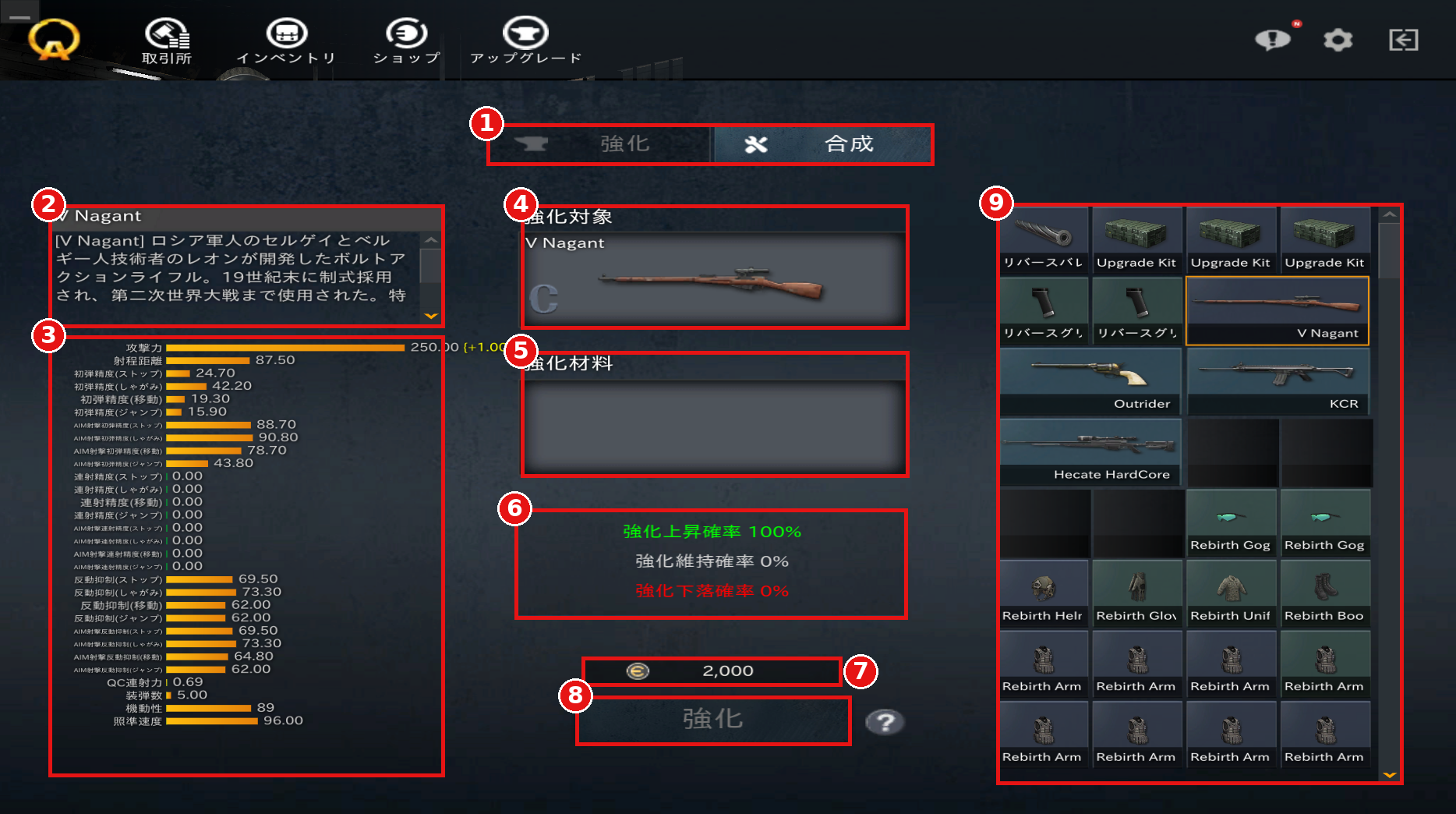
①Enhance / Combine
Switch between Enhance and Combine.
②Item Description
Displays the description of the selected item.
③Stats
Displays the stats of the selected item.
When an item is set as the enhancement target, the increase on success is shown, such as (+1.00).
④Enhancement Target
Double-click the item you want to enhance in your item list to set it.
⑤Enhancement Material
Set the item to be used as material.
⑥Enhancement Rates
Displays the probability that the enhancement level will increase (上昇), stay the same (維持), or decrease (下落).
The rates change depending on the item's current enhancement level.
⑦Enhancement Cost
Displays the EUR required for the enhancement.
⑧Enhance
Press this with the target and material set to perform the enhancement.
⑨Item List
Displays the items you own.
Items that cannot be enhanced, such as throwables and certain in-game items, are shown as empty slots.
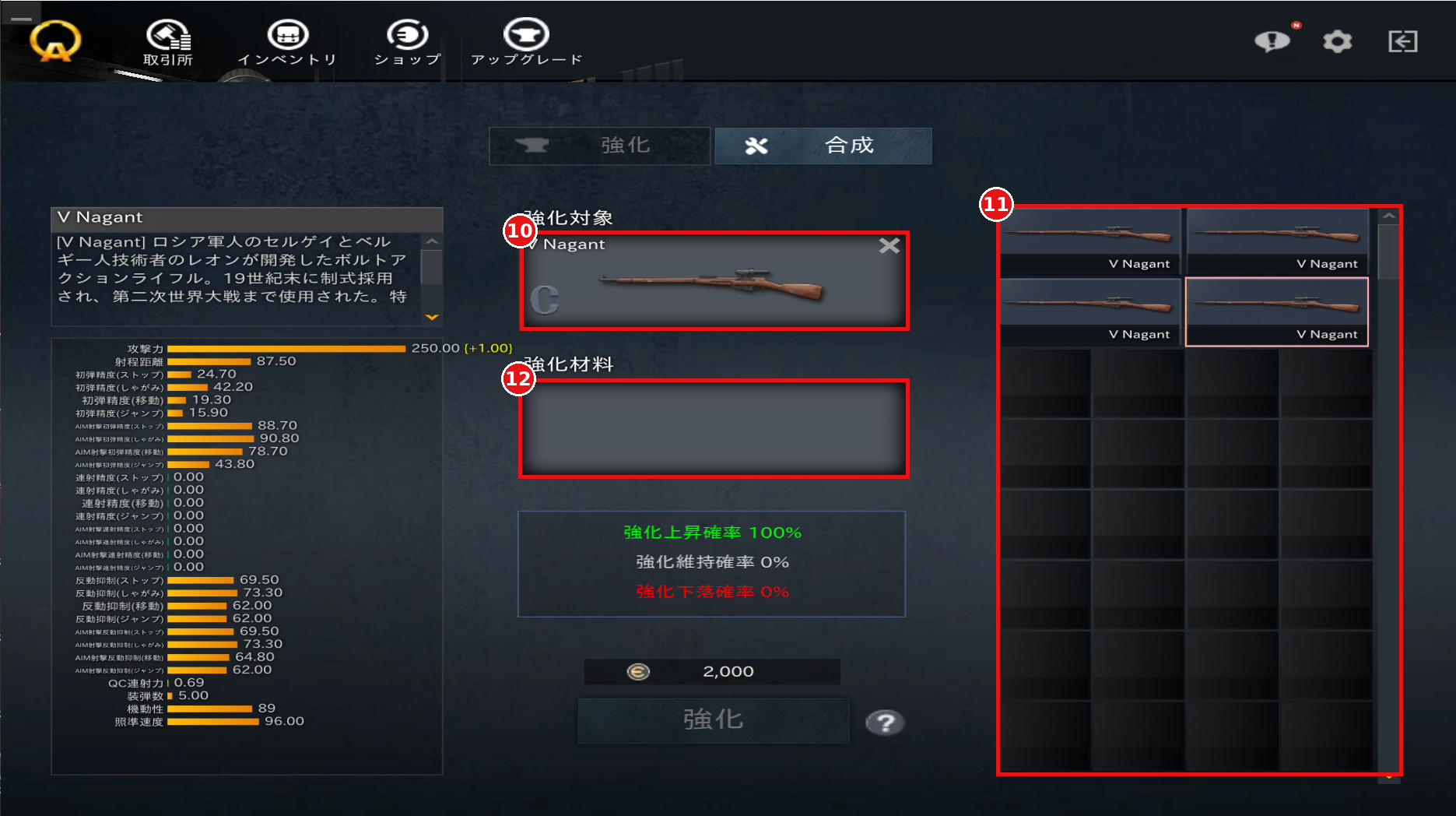
⑩Enhancement Target
Displays the item you set. Click the "×" in the upper right to remove it.
⑪Material Candidates
Once a target is set, only copies of the same item are displayed.
The material must be the same item as the target.
※Items with an enhancement level higher than the target's are displayed in the list but cannot be used as material.
⑫Enhancement Material
Double-click an item from the candidates to set it as material.
※Material items are consumed regardless of the enhancement result.
■Combine
You can combine items of the same type (firearms with firearms, armor with armor, etc.) as materials to obtain a new item.
The rank probabilities of the resulting item change depending on the materials you set.
※As of October 2026, the highest rank obtainable through combining is Rank A.
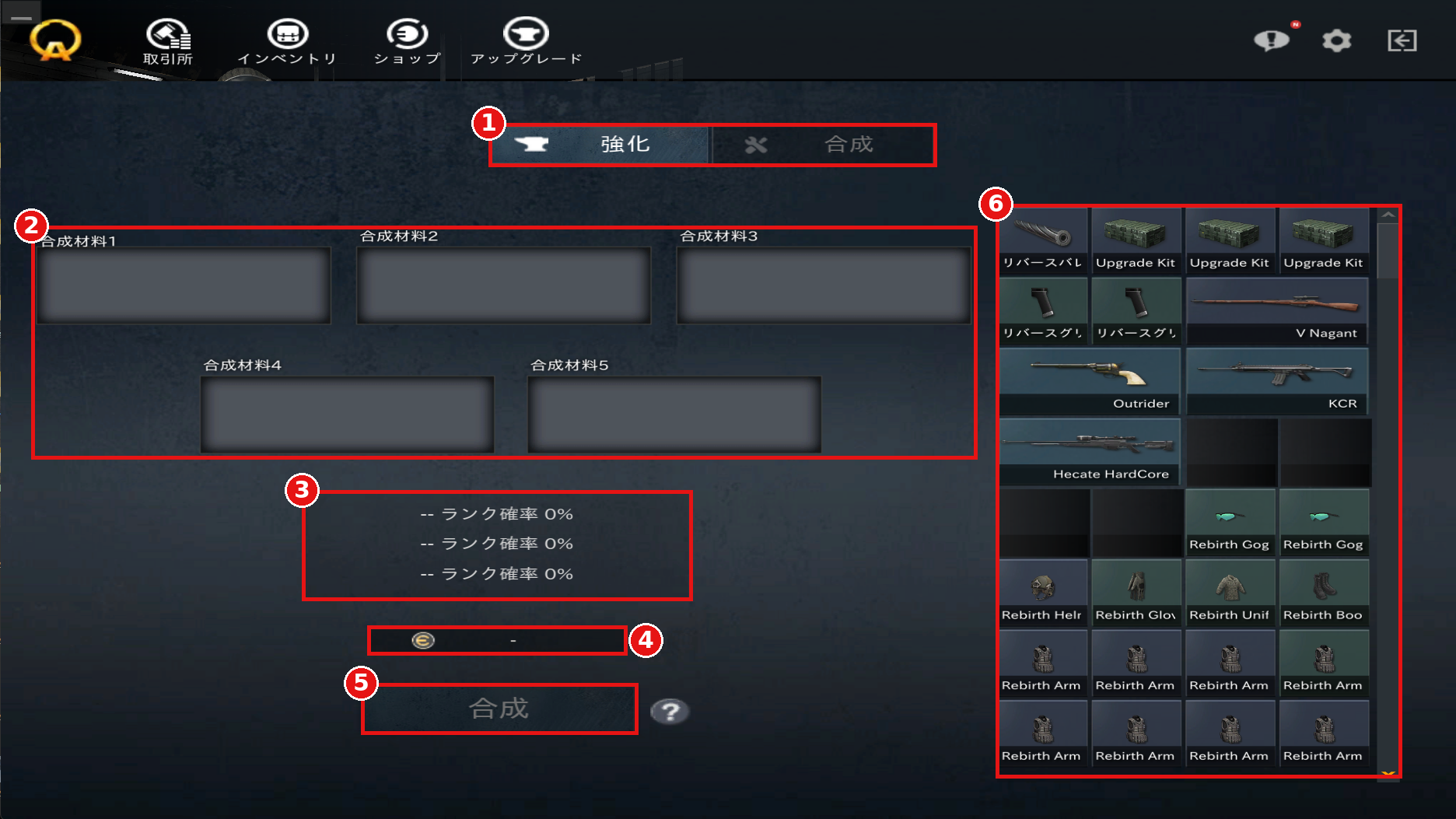
①Enhance / Combine
Switch between Enhance and Combine.
②Combine Materials
Click items in your item list to set them as materials.
Up to five materials (slots 1–5) can be set.
③Rank Probabilities
Displays the ranks you can obtain and their probabilities.
④Combine Cost
Displays the EUR required for combining.
⑤Combine
Press this with materials set to perform the combine.
⑥Item List
Displays the items you own.
Items that cannot be combined are shown as empty slots.
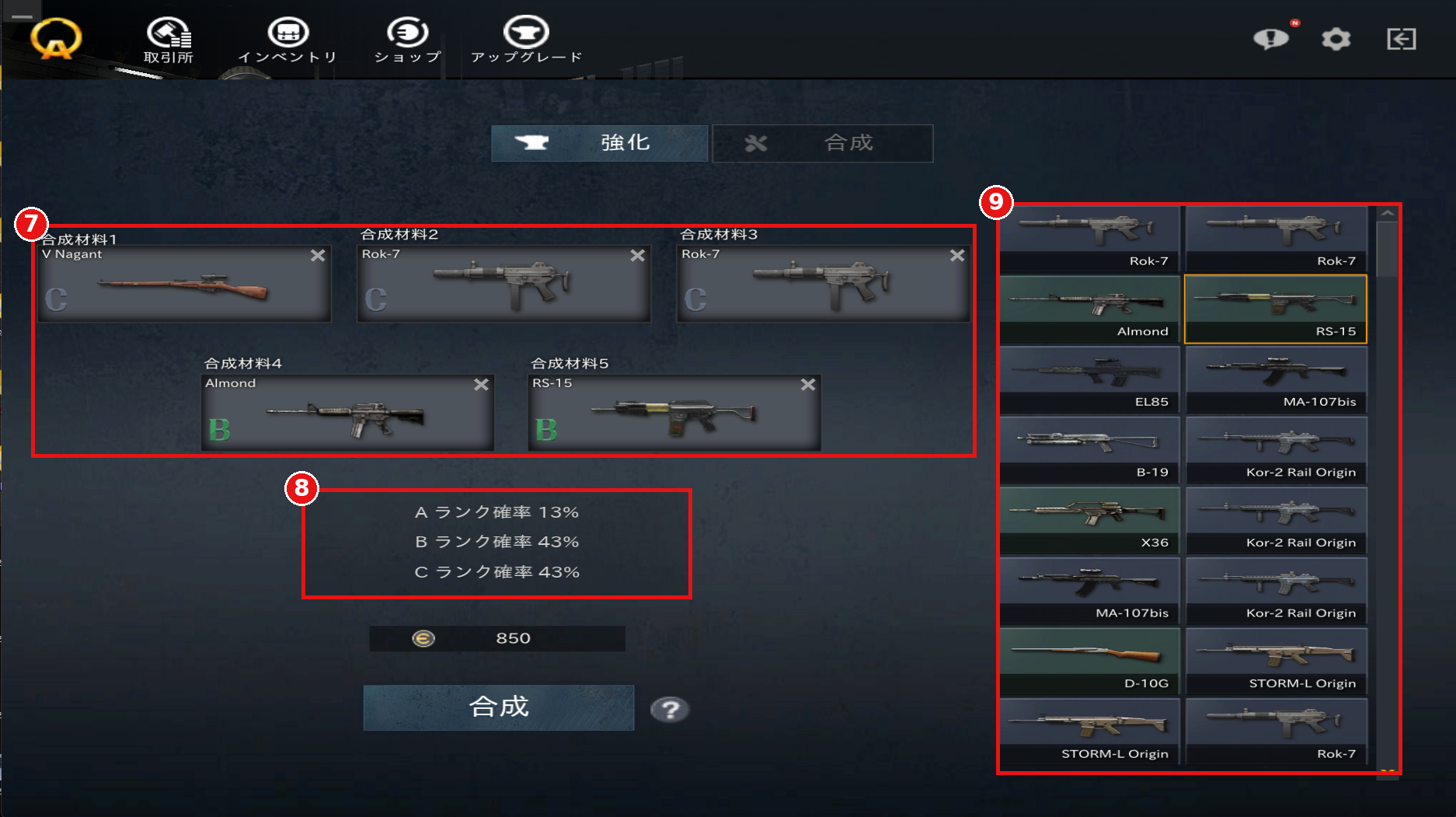
⑦Combine Materials
Displays the items you set. Click the "×" in the upper right to remove them.
⑧Rank Probabilities
Displays the probability for each rank you can obtain, based on the materials you set.
⑨Material Candidates
When you click an item to set it, the list switches to the material selection view and shows only items of the same type.
Click additional items to set them as materials.
※All material items are consumed when combining.
You can enhance and combine items from "Upgrade" (アップグレード) at the top of the Main Lobby.
You can also get there from the arrow icon in Item Information in the Inventory.
Use the tabs at the top of the screen to switch between "Enhance" (強化) and "Combine" (合成).
■Enhance
You can enhance an enhanceable item by using a copy of the same item as material.
When an enhancement succeeds, an enhancement level such as "+1" appears on the item name.
①Enhance / Combine
Switch between Enhance and Combine.
②Item Description
Displays the description of the selected item.
③Stats
Displays the stats of the selected item.
When an item is set as the enhancement target, the increase on success is shown, such as (+1.00).
④Enhancement Target
Double-click the item you want to enhance in your item list to set it.
⑤Enhancement Material
Set the item to be used as material.
⑥Enhancement Rates
Displays the probability that the enhancement level will increase (上昇), stay the same (維持), or decrease (下落).
The rates change depending on the item's current enhancement level.
⑦Enhancement Cost
Displays the EUR required for the enhancement.
⑧Enhance
Press this with the target and material set to perform the enhancement.
⑨Item List
Displays the items you own.
Items that cannot be enhanced, such as throwables and certain in-game items, are shown as empty slots.
⑩Enhancement Target
Displays the item you set. Click the "×" in the upper right to remove it.
⑪Material Candidates
Once a target is set, only copies of the same item are displayed.
The material must be the same item as the target.
※Items with an enhancement level higher than the target's are displayed in the list but cannot be used as material.
⑫Enhancement Material
Double-click an item from the candidates to set it as material.
※Material items are consumed regardless of the enhancement result.
■Combine
You can combine items of the same type (firearms with firearms, armor with armor, etc.) as materials to obtain a new item.
The rank probabilities of the resulting item change depending on the materials you set.
※As of October 2026, the highest rank obtainable through combining is Rank A.
①Enhance / Combine
Switch between Enhance and Combine.
②Combine Materials
Click items in your item list to set them as materials.
Up to five materials (slots 1–5) can be set.
③Rank Probabilities
Displays the ranks you can obtain and their probabilities.
④Combine Cost
Displays the EUR required for combining.
⑤Combine
Press this with materials set to perform the combine.
⑥Item List
Displays the items you own.
Items that cannot be combined are shown as empty slots.
⑦Combine Materials
Displays the items you set. Click the "×" in the upper right to remove them.
⑧Rank Probabilities
Displays the probability for each rank you can obtain, based on the materials you set.
⑨Material Candidates
When you click an item to set it, the list switches to the material selection view and shows only items of the same type.
Click additional items to set them as materials.
※All material items are consumed when combining.